How to Install the Belowland Minecraft Mod: A Complete Horror Guide
Learn how to install and survive the Belowland Minecraft mod. Discover requirements, key features, and tips for this slow-burn horror experience.
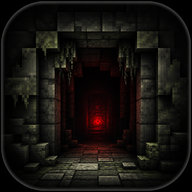
If you are looking to turn your standard block-building experience into a terrifying psychological thriller, the Belowland minecraft mod is exactly what you need. Horror mods have taken the community by storm, but few offer the slow-burn dread found in this unique addition. In this guide, we will cover everything you need to know to install the Belowland minecraft mod, ensuring your game runs smoothly without visual glitches. Prepare yourself to face eerie dimensions, unsettling ambient noises, and stalker entities that will make you think twice about mining in the dark.
What is the Belowland Minecraft Mod?
Also known by its project name outln.frombelowland, the Belowland minecraft mod is an alpha-stage horror mod developed by Lock and a dedicated team of contributors. Heavily inspired by the infamous wonderland.jar and Grace, it is designed to be an intentionally slow-paced nightmare.
Instead of throwing jump scares at you immediately upon spawning, the mod waits. Roughly three to four in-game days will pass before anything truly unsettling begins to happen. This gives you just enough time to build a false sense of security. Players report eerie fog rolling in, bizarre terrain generation, and ambient sounds that perfectly set a dreadful mood.
Essential Requirements and Installation Steps
Before diving into the terrifying depths, you must ensure your game is properly configured. The Belowland minecraft mod has specific compatibility rules due to its custom shaders and rendering techniques.
Important Compatibility Warning: Do not use Optifine, Sodium forks, or Embeddium. These optimization mods rewrite how the game renders, which completely breaks the custom shaders used to create the mod's terrifying atmosphere.
Step-by-Step Installation:
- Download the required version of Minecraft Forge or Fabric (depending on the latest mod release).
- Download the GeckoLib mod from Modrinth or your preferred mod repository.
- Download the latest version of the Belowland mod.
- Navigate to your
.minecraft/modsfolder on your computer. - Drop both the Belowland
.jarfile and the GeckoLib.jarfile into the folder. - Launch the game using your modded profile.
Surviving Your First Days in Belowland
When you first spawn into your world, things might seem perfectly normal. Use this three to four-day grace period wisely. Gather essential resources, build a secure base, and prepare your armor. According to community reports, players who fail to establish a safe house before the events trigger often find themselves overwhelmed by stalker entities.
If you are feeling brave and want to skip the grace period, you can make the mod more aggressive immediately. By typing the /belowland command in the chat, you can access a list of commands to manually trigger events and force the horror to start early.
Key Features, Dimensions, and Items
The Belowland minecraft mod introduces a wealth of new content, from spooky imagery to entirely new dimensions like the Liminal dimension. Exploring these areas requires specific tools, quick reflexes, and a lot of courage.
One of the standout features is the incredible sound design. The mod features custom music and SFX composed by a talented audio team, ensuring every creak and groan keeps you on edge.
Notable Items and Entities:
- Infected Hook: Crafted with items like amethyst and feathers, this acts as a biological grappling hook. You can hold right-click to latch onto surfaces and reel yourself in—perfect for quick escapes.
- Eye Flare: A mysterious item that provides unique visual effects and interactions. Be careful when and where you use it, as it can attract unwanted attention.
- Helper Entities: Not everything wants to kill you. Players have discovered friendly entities, such as deployable helper moths (affectionately named "Molly" by the community), which you can even ride to traverse difficult terrain.
Community Experiences and Gameplay Tips
Based on player experience, the Belowland minecraft mod excels at making you feel constantly paranoid. The dynamic fog system can obscure massive, terrifying structures that look like doomsday devices, only revealing them when you are far too close for comfort.
If you plan to venture into the caves, ensure you have plenty of torches, but be wary of placing too many if the game warns against it. Some entities react unpredictably to light, while others thrive in pitch-black darkness. Always keep your Infected Hook on your hotbar; it is your best tool for evading sudden ambushes from stalker entities.
For those who want to experience the full terror, play with headphones. The spatial audio and ambient noise are crucial for detecting when an entity is stalking you from just outside your render distance.
Frequently Asked Questions (FAQ)
How long does it take for the Belowland minecraft mod to get scary? The mod is designed to be a slow-burn horror experience. It typically takes about 3 to 4 in-game days before the major scary events, loud noises, and aggressive entity spawns begin to occur.
Can I use shaders with the Belowland minecraft mod? No, you should avoid using optimization mods like Optifine, Sodium forks, or Embeddium. The mod features its own custom shaders to create its spooky atmosphere, and external rendering mods will break these visual effects.
How do I make the mod more aggressive immediately?
If you don't want to wait for the slow-burn horror to naturally escalate, you can use the /belowland command in-game. This opens up a list of commands that allow you to manually trigger scary events and increase the mod's overall aggression level.
What is the Liminal dimension? The Liminal dimension is a creepy, alternate world added by the mod. You can access it using specific late-game items. It features unique terrain, terrifying entities, and peak sound design that will test your survival skills.
Related Guides
How to Install the Belowland Forge Mod: Complete Setup Guide
Learn how to safely install the Belowland forge mod for Minecraft. Discover setup steps, requirements, and tips to survive this slow-burn horror experience.
The Ultimate Belowland Install Guide: Setup Your Minecraft Mod Easily
Looking for a complete Belowland install guide? Learn how to download, install, and troubleshoot this massive Minecraft mod with our step-by-step tutorial.